Kroger
- 4.4
- Rating
- 10.00M
- Installs
- Free
- Price

 Analysis by App-foxy
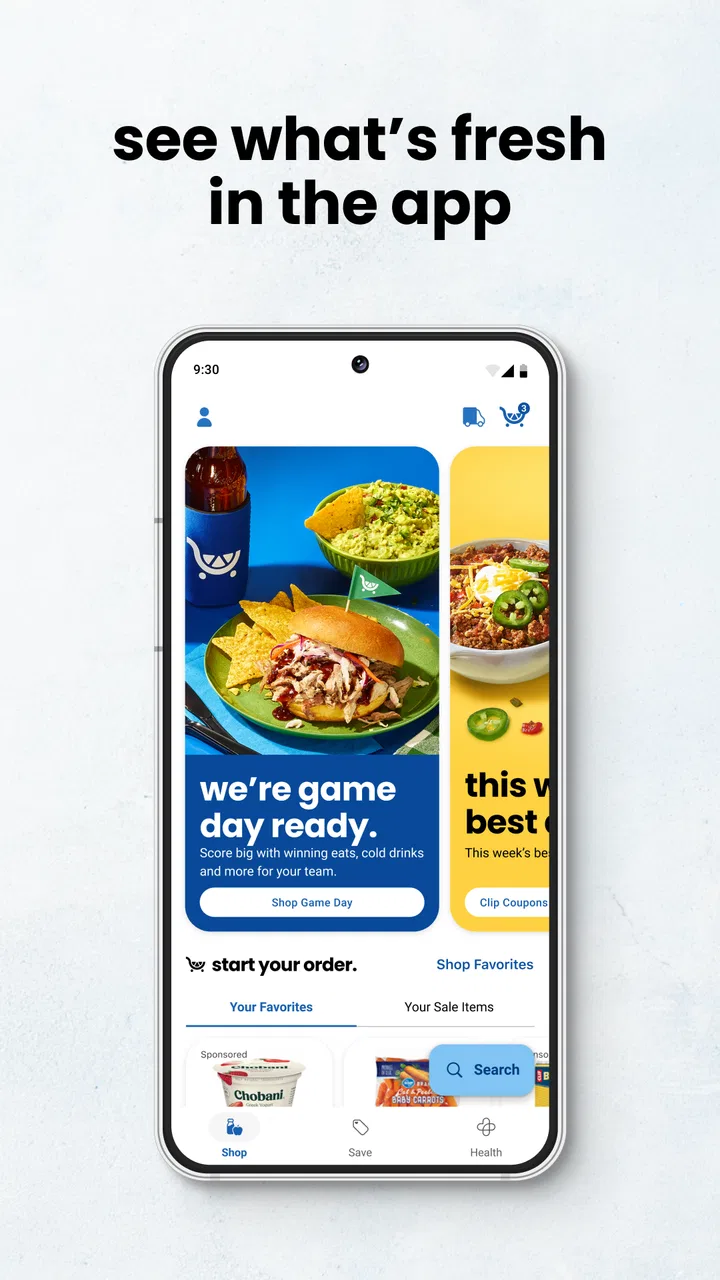
I usually judge a shopping app by what happens after the first enthusiastic week. Saving a coupon once is easy; remembering to open the app before every grocery trip is the real test. Kroger makes a strong first impression because it brings several routine tasks into one place: browsing current deals, checking rewards, building a shopping list, and locating a nearby store. In my experience, that combination is more useful than a flashy interface because it fits the way grocery shopping actually happens.
This is a free shopping app from The Kroger Co., intended for everyone and available on Android from version 8.0 onward. It has been around since November 29, 2010, so it feels less like a temporary promotional tool and more like a digital companion for regular Kroger customers. The current version is 92.0, and its broad adoption is reflected in an average rating of 4.4 from around 374,000 ratings, with more than 10 million installs.
That popularity should not automatically decide whether it belongs on your phone. The better question is whether you shop at Kroger often enough to justify another app in your routine. After using it as a practical grocery tool, I think the answer is yes for frequent customers, especially people who actively use digital offers. For occasional visitors, the value is less obvious, and the app can become one more place to manage before a shopping trip.
You May Also Like

 Blood Strike: 2.5 Anniversary
Blood Strike’s Loadouts Turn Every Drop Into a Tactical Gamble
A close look at Blood Strike’s custom loadouts: how fast access to signature weapons reshapes its battle royale rhythm, rewards preparation, and narrows the gap between fights.

 Pandora - Music & Podcasts
Pandora’s Music Is Easy to Start, but Harder to Recover
Pandora’s strength is its low-effort path from a seed to a station. Its weak spot is how much confidence it asks you to place in connection, setup, and quiet recovery.

 8 Ball Pool
 Is Built on Rivalries, Rematches, and Routine
A close look at the rivalries, rematches, shared routines, and unanswered safety questions that turn a quick pool match into a persistent mobile community.

 Samsung Music
’s Quiet Strength Is Playing What You Already Own
Its reach comes less from spectacle than from dependable access to a personal library. That simplicity is both the app’s strongest retention engine and its ceiling.

 AccuWeather: Weather Radar
AccuWeather Review: A Quick, Clear Forecast for Everyday Decisions
For everyday plans, the best forecast is the one you can understand quickly. AccuWeather makes rain timing, radar, and local conditions easy to act on, with a few trade-offs.

 Hill Climb Racing
Why Hill Climb Racing Still Turns Crashes Into One More Run
A tiny car, a bumpy hill and one more upgrade: Hill Climb Racing keeps resurfacing because its simple chaos makes every near-miss feel personal.
More From Our News Desk
View All News


What feels useful during the first week
The first-week appeal comes from the way the app connects planning and savings. Instead of checking a paper advertisement, making a separate list, and trying to remember which rewards account is attached to a purchase, I can treat the app as the starting point for the trip. I look through the available offers, decide what is actually relevant, and then build the list around meals or household needs rather than wandering through the store.
That workflow matters because grocery savings are rarely about finding one spectacular deal. They come from noticing several small opportunities before leaving home. The app encourages that behavior by putting coupons and store information near the rest of the shopping process. I find it more practical than opening a general coupon app and then trying to connect those offers to a specific supermarket visit.
The shopping list is most helpful when I use it before I start browsing deals. I write down the essentials first, then check whether any of those items have an available offer. This avoids a common trap: filling a list with discounted products that were never needed. The app can support a disciplined trip, but it does not create discipline on its own. If I browse promotions without a plan, the savings tools can just make impulse purchases feel more reasonable.
Store-finding is another small feature that becomes important in real life. It is useful when I am away from my usual neighborhood, comparing locations, or trying to decide where a quick stop makes sense. I would not install the app only for this purpose, since a map app can also locate stores, but having store discovery beside the list and deals reduces the number of separate steps.
The rewards area is central to the experience. For someone who already shops at Kroger, keeping rewards-related activity in the same app is more convenient than treating loyalty benefits as something remembered only at the checkout. The practical advantage is not that the app makes every purchase cheaper; it is that it gives me a better chance of noticing savings before I pay.
A realistic first-week scenario looks like this: I plan a midweek grocery trip, open the app at home, scan the current offers, and add only the useful ones to my plan. I then make a short list for dinner ingredients, breakfast items, and cleaning supplies. At the store, the list keeps me focused, while the offers remind me which purchases were worth checking. The process is not revolutionary, but it is quicker than juggling a handwritten list and a separate collection of promotional information.
Where the early convenience has limits
The app is not equally valuable for every shopping style. If I buy nearly identical items every week and already know exactly what they cost, I may not gain much from browsing promotions. Likewise, if I shop at several supermarket chains, a store-specific app cannot replace a broader comparison habit. Kroger is strongest when Kroger is already one of my regular destinations.
There is also a mental cost to having more choices. A list can become cluttered, and a long collection of offers can take longer to review than it saves. My best results come from treating the app as a filter, not as a catalogue to explore endlessly. I decide what I need first, then use the app to improve that plan.
People who dislike creating accounts, checking rewards details, or managing digital coupons may find the experience more tiring than a simple paper list. The app is designed around connected shopping tasks, so its advantages are greatest when I am willing to use more than one of them. Someone looking only for a store address may find the overall package unnecessary.
Why the value can continue from month to month
The lasting value is tied to repetition. Grocery shopping happens often, and a small improvement repeated across many trips can matter more than a dramatic one-time benefit. I am more likely to keep an app when it helps with a recurring task without demanding a completely new routine. Kroger has a reasonable chance of earning that space because its core functions match a weekly or monthly shopping cycle.
Coupons and ads are most useful when they influence decisions I was already going to make. I can check them before planning meals, use the list to avoid forgetting staples, and revisit the store-finding function when my location changes. This creates a simple loop: plan, check offers, shop, and repeat. The app does not need to be exciting for that loop to be worthwhile.
One of the less obvious benefits is that the app can help separate preparation from browsing. I can make a list when I have time, rather than trying to remember everything while standing in an aisle. That is particularly useful for households where several people contribute requests. A shared paper note can work, but a digital list is easier to carry and revise during the days before the trip.
Another useful trade-off is the relationship between savings and attention. The app may help me find relevant offers, but I still have to spend time reviewing them. For a regular Kroger shopper, that time can become part of the normal planning ritual. For a very busy shopper who buys only a few items, opening the app may feel like overhead. The recurring value depends on the size and frequency of the shopping trip, not simply on the number of available features.
I also like that the app can serve different levels of organization. On a rushed day, I can use it just to check a deal or find a store. On a more deliberate trip, I can combine the rewards area, offers, and list. That flexibility helps it survive beyond novelty. I do not have to use every part on every visit, which is important for an app that is meant to support a routine rather than become the routine itself.
How it compares with ordinary alternatives
The usual alternative is a paper list plus a store flyer. That approach is still appealing because it is immediate, private, and free of notifications or account management. However, it separates planning from digital rewards. Kroger is more convenient when I want to connect the list with the store’s own offers and loyalty tools.
A general notes app is better for a multi-store household because it is not tied to one retailer. It may also be faster for a simple list. The Kroger app earns its place when the extra store-specific information changes what I buy or helps me prepare more accurately. If I rarely use promotions, the general notes app may remain the cleaner option.
General coupon apps can be useful for comparing retailers, but they often add another layer between the offer and the actual trip. Kroger’s advantage is focus: the information is centered on Kroger shopping rather than on every possible store. That focus is a weakness if I want broad price comparison, but a strength if I have already chosen where I am going.
Maps are usually better for navigation and location search, while this app is better as a shopping hub. I would not replace a dedicated map application with it, but I appreciate not having to leave the shopping workflow whenever I need to confirm a store. The right comparison is not whether it beats every alternative at every task; it is whether combining several Kroger tasks feels easier than using separate tools.
The maintenance burden after the novelty fades
The main maintenance task is remembering to open the app before shopping. That sounds minor, but it determines whether the savings features become useful or remain invisible. I get the most from it when I check offers while making the list, not when I am already at the checkout. A recurring calendar reminder or a fixed habit—checking it while planning meals—can make the app more dependable without requiring constant attention.
List maintenance also needs a sensible routine. If I leave completed items, outdated requests, or duplicate entries in the list, it becomes less trustworthy. I prefer to clear it after each trip and rebuild it around the next one. This is a small but important insight: the app works better as a fresh planning surface than as a permanent archive of every item I might buy someday.
Rewards and coupon management can create friction when I treat every offer as urgent. I have found it better to select only deals connected to my actual plan. That reduces visual noise and protects the main purpose of the app. A shopping tool should help me make decisions, not turn the preparation stage into a second browsing session.
There is also the ordinary maintenance of keeping the app current. The minimum operating system requirement is Android 8.0, which covers many devices but still matters to anyone using an older phone. The current version is 92.0, so the app is actively presented as a modern product rather than an abandoned utility. Even so, people with older hardware should expect their overall experience to depend on how well their phone handles current applications.
I would also consider storage, notifications, and attention as part of maintenance, even when they are not the reason someone installs a grocery app. If alerts become excessive or irrelevant, I would adjust them rather than uninstall immediately. The app is more likely to remain useful when it appears at the right planning moment instead of interrupting unrelated parts of the day.
What can cause shopping fatigue
The biggest source of fatigue is promotional overload. Deals are helpful only when I can quickly identify the ones that matter. A long browsing session can make grocery planning feel like work, particularly when I am shopping for a small number of items. The solution is to set a stopping point: once the list is complete and the relevant offers are checked, I leave the app.
Another source of frustration is the gap between planning and real-world availability. A digital offer may look appealing at home, but the item may not fit the trip, the budget, or the store’s current selection. I try not to build an entire meal plan around a single promotion. The app is best used to support flexible decisions, not to make me dependent on one expected purchase.
There is a similar risk with rewards. Loyalty tools can encourage me to think about every purchase through the lens of earning or saving. That can be worthwhile for a regular customer, but it is not automatically economical. I still compare the final basket with what I intended to buy. A discount on an unnecessary item is not a saving, and the app cannot make that judgment for me.
People who shop impulsively may find the promotional design especially distracting. In that case, the list should be the centre of the experience, with offers used only as a secondary check. Conversely, careful bargain hunters may wish the app could replace a complete cross-store comparison process; it cannot, because its value is concentrated around Kroger rather than the entire grocery market.
Who should keep it installed
I would recommend keeping it installed if Kroger is a regular part of your grocery routine and you are willing to plan at least briefly before shopping. Families, frequent shoppers, and anyone who actively uses store rewards are the clearest match. The combination of a list, promotions, rewards, and store discovery gives those users several reasons to return instead of relying on one isolated feature.
It is also a good fit for people who often forget small items. The list is not a substitute for good planning, but it gives me a reliable place to capture needs as they come up. I can add an item when I notice it is running low, then use the same app when the shopping trip arrives. That continuity is more valuable than a list created only at the last minute.
I would be more cautious if you shop at Kroger only once in a while, prefer independent stores, or want a single tool that compares prices across many retailers. In those cases, a general list app, a broader coupon service, or a combination of tools may suit you better. The focused nature that makes this app convenient for Kroger customers also limits its usefulness outside that ecosystem.
The app is free, which makes trying it low-risk, but “free” does not mean costless in attention. Its real price is the time spent checking offers and maintaining the list. I think that trade is fair when the app becomes part of an existing grocery habit. I do not think it is worthwhile to force it into a routine that does not match the way you shop.
Its Everyone content rating also makes it suitable for a broad household audience. That does not change the practical advice: each person should use only the features that solve a real problem. One household member might manage the list, while another checks offers, but the app does not need to become a shared project to be useful.
A practical long-term verdict
After the first-week novelty fades, Kroger remains worthwhile because its strongest features support a repeated grocery cycle rather than a one-time discovery. I can plan a trip, check relevant savings, keep the list close at hand, and find a store when needed. None of those tasks is remarkable alone, but together they reduce the small bits of friction that make routine shopping disorganized.
My recommendation comes with a condition: use it deliberately. Start with the list, check only offers related to that list, and treat rewards as a way to improve planned purchases rather than a reason to add more items. That workflow reveals the app’s lasting value while avoiding the promotional fatigue that can make it feel like another chore.
The strongest reason to keep it is consistency. If I shop at Kroger regularly, the app can become a quiet part of preparation, saving time and helping me remember what matters. The strongest reason to skip it is also clear: if I need cross-store comparisons or dislike managing digital promotions, its focused design may not justify the extra attention.
Overall, I see this as a practical shopping companion rather than an essential app for everyone. The 4.4 average and large user base suggest that many shoppers find the approach useful, but my own verdict is more specific: it earns lasting space on the phone of a regular Kroger customer who turns it into a weekly habit. For that person, the value is not the excitement of discovering a new app. It is the steady improvement that comes from preparing a little better before each trip.
FAQs for Kroger
01What is the Kroger app and what can it do for me?
The Kroger app is a comprehensive shopping tool designed to enhance your grocery experience. It allows users to browse weekly ads, create shopping lists, and find digital coupons. The app also supports online shopping for delivery or pickup, making grocery shopping more convenient and efficient.
02How do I use digital coupons in the Kroger app?
To use digital coupons, simply log into your Kroger account via the app, navigate to the Coupons section, and browse available offers. Tap to load the desired coupons to your account. These will automatically apply at checkout when you use your Kroger Plus Card, either in-store or online.
03Can I track my order status through the Kroger app?
Yes, you can easily track your order status within the Kroger app. After placing an order for delivery or pickup, navigate to the 'My Orders' section. Here, you’ll find real-time updates on your order status, from processing to ready for pickup or out for delivery.
04Is the Kroger app available on both Android and iOS devices?
Absolutely! The Kroger app is available for both Android and iOS devices. You can download it from the Google Play Store for Android devices and the Apple App Store for iOS devices, ensuring compatibility with most smartphones and tablets.
05What security measures does the Kroger app have for online payments?
The Kroger app implements robust security measures to protect your online payments. It uses encryption technology to safeguard your personal and payment information. Additionally, the app supports secure payment methods like credit cards and digital wallets, ensuring your transactions are protected.
Pros
- User-friendly interface with intuitive navigation.
- Wide selection of products and categories.
- Convenient digital coupons and deals.
- Easy online ordering and pickup options.
- Personalized shopping recommendations.
Cons
- Occasional app crashes and bugs.
- Limited features in certain regions.
- Inconsistent delivery times reported.
- Account login issues for some users.
- Requires frequent updates for smooth use.

Kroger
Gallery